
Home » Archives for October 2007
Disqus: a new universal comment system for blogs
 There's a new universal comment system launching this morning called Disqus (pronounced "discuss") that's aiming to improve the world of commenting for both users AND blog creators. Their take on comments is a little bit like OpenID's stance on logins: give users one identification for many places, while mixing it up with the social tracking capabilities found in coComment and Twitter.
Blog owners who install Disqus to replace their default commenting system get the added benefit of creating a separate forum for each post that mirrors whatever discussion is on the comment thread. In return, users can maintain the same Disqus identity on multiple sites assuming blog owners are willing to buy into the system. Unlike a comment tracking system like coComment (review) however, the onus to be a part of the community falls on the site proprietor instead of the user.
 A comment thread in Disqus features multi-level threading, and ways to vote up or down a single comment. You can also check out someone's clout without leaving the page.
(Credit: CNET Networks)As a commenting system it's very full featured. There's threading that I tested to go six levels deep (a step up from most default comment architecture), and a per-comment voting system that lets users vote on the quality of a response using up and down icons. Users can then sort the comments by chronology, or the most votes on the fly.
Also worth noting is the profile system, which like coComment, lets you see a user's list of comments, and links to where they've been making them. While you can comment anonymously to your heart's content on any Disqus comment board, you can also come back later on to claim your profile in order to start maintaining an identity on other sites--a kind of "try before you buy" approach. If you end up claiming your profile on one site, your "anonymous" identities on other sites will link to your identity.
One neat takeaway is that Disqus lets you track other Disqus users in a similar fashion to Twitter and coComment, throwing all their latest comments (and links to where they've been reading) into one public stream. As an added bonus, each user gets a "clout" rating, which is an aggregate measure of how their comments are being rated in various networks. The higher the clout, the better their perceived reputation is to other casual observers.
Disqus is free, and works with major Web blogging platforms like Wordpress, Blogger, Typepad, and MovableType. If your blog falls elsewhere, there's also a snippet of javascript code you can drop into every post, or add to your site's post template to add Disqus comments. I've embedded a Disqus comment module after the break, so feel free to give it a spin.
Google pitches Gphones to Verizon
Google is pitching its vaunted Gphone to Verizon Wireless, but the odds are still against the search giant striking a major deal with the second largest phone company in the U.S.
The Wall Street Journal and Reuters reported Tuesday evening that Google is in "serious discussions" with Verizon Wireless to put its mobile "GPhone" software on Verizon phones.
For months, people have been speculating about the rumored Google "GPhone." Most people believe that it's not a specific phone, but is more likely an operating system or software that integrates many of Google's mobile services, like Web search, Gmail, Youtube, and Google Maps, onto phones made by existing handset makers. But more than simply integrating Google services onto handsets, the new Google mobile OS is believed to be an open platform on which application developers would have free reign to develop a slew of new applications and services.
 The WSJ said in an earlier article published Monday that Asian cell phone makers HTC and LG Electronics will be the first two handset makers to use the software.
But Google-powered phones will be useless unless the company can strike deals with mobile operators to allow them on their networks. T-Mobile USA is rumored to be the first U.S. operator that will sign on with Google. And now the WSJ has said that Verizon Wireless is also in "serious discussions" with Google over using phones that have its new software embedded.
Verizon Communications Chief Operating Officer Denny Strigl admitted on Monday during an investor call that the phone company has been in talks with a lot of companies, including Google. But he didn't elaborate. His comment was in response to a question about the upcoming 700Mhz auction.
Verizon and Google have been publicly squabbling for months over the "open" provisions the Federal Communications Commission adopted as part of the upcoming 700 MHz spectrum. The provisions require winners of the spectrum auction to allow any device to connect to networks using that spectrum. Verizon had filed a lawsuit against the FCC. But last week, it dropped its complaint and said it would no longer appeal the provision.
Despite this change of heart, Verizon Wireless' history indicates that it's still very unlikely the company would agree to offer phones with tons of Google-branded services on an open platform. The reason is very simple. Of all the mobile operators in the U.S., Verizon is the most aggressive in protecting its "walled garden." It has some of the most stringent testing of new phones, and it is very selective about the applications it allows onto its "deck."
What's more, Verizon is also very cautious about allowing other companies to brand services on its network. For example, Verizon Wireless uses a search application from a smaller company on its VCast mobile service, which it brands itself, instead of using a search tool from a bigger company such as Google or Yahoo. And instead of leveraging existing music libraries as its competitor AT&T has done, Verizon has built its own music and video library.
So what could Google and Verizon be talking about? The most likely scenario is that Google is offering Verizon the ability to use its operating system to integrate any applications it wants into its phones. Most of Verizon's phones today are built on either Qualcomm's BREW environment or on a Windows Mobile platform. Google may be offering Verizon a free or very cheap licensing deal to use its software on phones. Verizon could still lock-down the phones if it chooses. This means that the Google-powered phones on a Verizon network might not be "open" at all to consumers or developers.
The new Google software will also supposedly offer integration with advertising platforms. And this is something that Verizon or any mobile operator would likely find very interesting. Today, mobile advertising makes up a small fraction of revenue, but carriers expect to generate a significant amount of revenue from mobile advertising in the future.
At the end of the day, Google's biggest market for the supposed Gphone software may not be with any of the U.S. carriers. Instead, Google will likely find a great upside in aiming its open platform at the developing world where people are much more likely to access the Internet on a cell phone than they are on a PC.
"A Google-software enabled phone makes the most sense in emerging markets," said Charles Golvin, an analyst with Forrester Research. "The next 1 billion to 2 billion cell phone users are going to be people in these markets. And most of them will not own a PC. For Google to grow its Internet audience there, it makes much more sense for them to optimize the Web experience on a phone."
The Wall Street Journal and Reuters reported Tuesday evening that Google is in "serious discussions" with Verizon Wireless to put its mobile "GPhone" software on Verizon phones.
For months, people have been speculating about the rumored Google "GPhone." Most people believe that it's not a specific phone, but is more likely an operating system or software that integrates many of Google's mobile services, like Web search, Gmail, Youtube, and Google Maps, onto phones made by existing handset makers. But more than simply integrating Google services onto handsets, the new Google mobile OS is believed to be an open platform on which application developers would have free reign to develop a slew of new applications and services.
 The WSJ said in an earlier article published Monday that Asian cell phone makers HTC and LG Electronics will be the first two handset makers to use the software.
But Google-powered phones will be useless unless the company can strike deals with mobile operators to allow them on their networks. T-Mobile USA is rumored to be the first U.S. operator that will sign on with Google. And now the WSJ has said that Verizon Wireless is also in "serious discussions" with Google over using phones that have its new software embedded.
Verizon Communications Chief Operating Officer Denny Strigl admitted on Monday during an investor call that the phone company has been in talks with a lot of companies, including Google. But he didn't elaborate. His comment was in response to a question about the upcoming 700Mhz auction.
Verizon and Google have been publicly squabbling for months over the "open" provisions the Federal Communications Commission adopted as part of the upcoming 700 MHz spectrum. The provisions require winners of the spectrum auction to allow any device to connect to networks using that spectrum. Verizon had filed a lawsuit against the FCC. But last week, it dropped its complaint and said it would no longer appeal the provision.
Despite this change of heart, Verizon Wireless' history indicates that it's still very unlikely the company would agree to offer phones with tons of Google-branded services on an open platform. The reason is very simple. Of all the mobile operators in the U.S., Verizon is the most aggressive in protecting its "walled garden." It has some of the most stringent testing of new phones, and it is very selective about the applications it allows onto its "deck."
What's more, Verizon is also very cautious about allowing other companies to brand services on its network. For example, Verizon Wireless uses a search application from a smaller company on its VCast mobile service, which it brands itself, instead of using a search tool from a bigger company such as Google or Yahoo. And instead of leveraging existing music libraries as its competitor AT&T has done, Verizon has built its own music and video library.
So what could Google and Verizon be talking about? The most likely scenario is that Google is offering Verizon the ability to use its operating system to integrate any applications it wants into its phones. Most of Verizon's phones today are built on either Qualcomm's BREW environment or on a Windows Mobile platform. Google may be offering Verizon a free or very cheap licensing deal to use its software on phones. Verizon could still lock-down the phones if it chooses. This means that the Google-powered phones on a Verizon network might not be "open" at all to consumers or developers.
The new Google software will also supposedly offer integration with advertising platforms. And this is something that Verizon or any mobile operator would likely find very interesting. Today, mobile advertising makes up a small fraction of revenue, but carriers expect to generate a significant amount of revenue from mobile advertising in the future.
At the end of the day, Google's biggest market for the supposed Gphone software may not be with any of the U.S. carriers. Instead, Google will likely find a great upside in aiming its open platform at the developing world where people are much more likely to access the Internet on a cell phone than they are on a PC.
"A Google-software enabled phone makes the most sense in emerging markets," said Charles Golvin, an analyst with Forrester Research. "The next 1 billion to 2 billion cell phone users are going to be people in these markets. And most of them will not own a PC. For Google to grow its Internet audience there, it makes much more sense for them to optimize the Web experience on a phone."
Google launches open APIs for social networks
Borrowing a page from Sun's Java playbook, Google is announcing a way for programmers to build social applications for multiple Web sites at once.
Google's version of this "write once run anywhere" concept is called OpenSocial, a set of common application programming interfaces (APIs) that will enable developers to create applications for social networks, blogs and any Web sites that accept the OpenSocial code. Currently, developers have to write new programs for each site, even if the functionality will be the same on each site.
This initiative "marks the first time that multiple social networks have been made accessible under a common API," according to a Google statement.
This announcement illustrates how Google is courting developers and possibly attempting to outdo Facebook in openness. Facebook opened up its platform to developers in June and the site was immediately flooded with all sorts of useful and not-so-useful apps. Google, Yahoo and others have been heavily espousing the beauty of open platforms and making moves to that end.
Not surprisingly, Facebook, which recently reportedly chose Microsoft over Google for an exclusive ad and investment deal, is not one of the OpenSocial-enabled sites.
Google's social network, Orkut, is among the sites that will accept apps written using OpenSocial APIs, as is LinkedIn, hi5, iLike, Slide, Ning, Friendster, and Plaxo.
A Google representative would not say whether Google had talked to Facebook and MySpace about joining the initiative or comment on why they were not involved.
The OpenSocial resources for developers and Web sites will be available at code.google.com/apis/opensocial.
Google's version of this "write once run anywhere" concept is called OpenSocial, a set of common application programming interfaces (APIs) that will enable developers to create applications for social networks, blogs and any Web sites that accept the OpenSocial code. Currently, developers have to write new programs for each site, even if the functionality will be the same on each site.
This initiative "marks the first time that multiple social networks have been made accessible under a common API," according to a Google statement.
This announcement illustrates how Google is courting developers and possibly attempting to outdo Facebook in openness. Facebook opened up its platform to developers in June and the site was immediately flooded with all sorts of useful and not-so-useful apps. Google, Yahoo and others have been heavily espousing the beauty of open platforms and making moves to that end.
Not surprisingly, Facebook, which recently reportedly chose Microsoft over Google for an exclusive ad and investment deal, is not one of the OpenSocial-enabled sites.
Google's social network, Orkut, is among the sites that will accept apps written using OpenSocial APIs, as is LinkedIn, hi5, iLike, Slide, Ning, Friendster, and Plaxo.
A Google representative would not say whether Google had talked to Facebook and MySpace about joining the initiative or comment on why they were not involved.
The OpenSocial resources for developers and Web sites will be available at code.google.com/apis/opensocial.
Download Word to PDF Converter
Word to PDF Converter is the fast, affordable way to create professional-quality documents in the popular PDF file format. Its easy-to-use interface allows you to create PDF files by simply click the "Save as PDF" button from MS Word, creating documents which can be viewed on any computer with a PDF viewer.
Word to PDF Converter supports Font embedding, resolution, compression and multi-language. And Word to PDF Converter does not need any software such as adobe acrobat.
ow does it work:
Word to PDF Converter lets you instantly convert Microsoft Word documents into fully-formatted and professional-quality PDF file format. functioning as a plug-in to the applications that you use every day - Microsoft Word 98/2000/XP. Now you can create and convert PDF files in Microsoft Word, without the need for Adobe® Acrobat®!.
Microsoft Word Integration - Word to PDF Converter adds toolbars to Microsoft Word, allowing users true one-click PDF file creation.
Using Word to PDF Converter in Microsoft Word
Simply choose File/Open in Microsoft
Word to open a original Word document, then click the "Save as PDF" button in the toolbar to instantly create a PDF file from the Word document.
Word to PDF Converter retains the layout of the original Doc document, and it supports all PDF file settings, such as PDF Compatibility, Auto-Rotate, Resolution, Compress settings of PDF document, Colors settings of PDF document, Fonts settings of PDF document.
System Requirements:
x86-based personal computer
Microsoft Windows 95/98/NT/2000/ME/XP
Microsft Word 98/2000/XP /2003
No less than 32MB application RAM
30 MB hard disk space
screen resolution must be no less than 640x480 pixels
This product is licensed as a single product for a single system
Size: 3.0 MB
Word to PDF Converter supports Font embedding, resolution, compression and multi-language. And Word to PDF Converter does not need any software such as adobe acrobat.
ow does it work:
Word to PDF Converter lets you instantly convert Microsoft Word documents into fully-formatted and professional-quality PDF file format. functioning as a plug-in to the applications that you use every day - Microsoft Word 98/2000/XP. Now you can create and convert PDF files in Microsoft Word, without the need for Adobe® Acrobat®!.
Microsoft Word Integration - Word to PDF Converter adds toolbars to Microsoft Word, allowing users true one-click PDF file creation.
Using Word to PDF Converter in Microsoft Word
Simply choose File/Open in Microsoft
Word to open a original Word document, then click the "Save as PDF" button in the toolbar to instantly create a PDF file from the Word document.
Word to PDF Converter retains the layout of the original Doc document, and it supports all PDF file settings, such as PDF Compatibility, Auto-Rotate, Resolution, Compress settings of PDF document, Colors settings of PDF document, Fonts settings of PDF document.
System Requirements:
x86-based personal computer
Microsoft Windows 95/98/NT/2000/ME/XP
Microsft Word 98/2000/XP /2003
No less than 32MB application RAM
30 MB hard disk space
screen resolution must be no less than 640x480 pixels
This product is licensed as a single product for a single system
Size: 3.0 MB
Download AutoCAD 2007 for free

AutoCAD 2006, the 20th release of AutoCAD software, increases efficiency with across-the-board improvements to bring productivity up and lag time down.
AutoCAD® 2006 is a software to realize your ideas with maximum speed, power, and efficiency.
Beginning with dramatically smaller file sizes in AutoCAD® 2004, and continuing with the Sheet Set Manager in AutoCAD® 2005, Autodesk is raising the bar on productivity once again with
AutoCAD 2006. From the new dynamic blocks capability that allows you to quickly create, manipulate, and extract data from blocks, to heads-up design, which keeps your focus on your work rather than on the software,
AutoCAD 2006 makes an impact on the way you work, every single day.
Dynamic Blocks
Blocks are a lot smarter in this release. As designs become more complex, block libraries grow. And as block libraries grow, data becomes difficult to manage.
AutoCAD 2006 puts the control back where it belongs—with you. Dynamic blocks dramatically reduce cumbersome block libraries and enable you to modify block geometry during insertion with new grips and action features.
AutoCAD 2006 helps you no longer have to shift your focus between your drawing and the command line. In addition to the traditional method of entering information,
AutoCAD 2006 puts the power of the command line at the graphics cursor, where you can enter dimensional and command option information as you work. Also new in this release are customizable tool palettes. Whether you want commands, blocks, macros, company standards, or LISP routines, you can have the content you use every day, organized the way you use it.
What's New in AutoCAD 2006
Boost your everyday productivity with these new features:
Dynamic blocks give you more drafting control and flexibility over your current blocks, allowing greater manipulation while dramatically reducing the size of block libraries.
Improved annotation and composition features help streamline the creation, placement, and editing of textual and table information and greatly enhance hatching capabilities.
The enhanced user interface puts the power of the command line at the graphics cursor, where you can enter dimensional and command option information as you work and get immediate feedback.
Migration tools streamline the migration process, so you can upgrade easily while preserving customization of toolbars and menus.
Download Now
AutoCAD® 2006 is a software to realize your ideas with maximum speed, power, and efficiency.
Beginning with dramatically smaller file sizes in AutoCAD® 2004, and continuing with the Sheet Set Manager in AutoCAD® 2005, Autodesk is raising the bar on productivity once again with
AutoCAD 2006. From the new dynamic blocks capability that allows you to quickly create, manipulate, and extract data from blocks, to heads-up design, which keeps your focus on your work rather than on the software,
AutoCAD 2006 makes an impact on the way you work, every single day.
Dynamic Blocks
Blocks are a lot smarter in this release. As designs become more complex, block libraries grow. And as block libraries grow, data becomes difficult to manage.
AutoCAD 2006 puts the control back where it belongs—with you. Dynamic blocks dramatically reduce cumbersome block libraries and enable you to modify block geometry during insertion with new grips and action features.
AutoCAD 2006 helps you no longer have to shift your focus between your drawing and the command line. In addition to the traditional method of entering information,
AutoCAD 2006 puts the power of the command line at the graphics cursor, where you can enter dimensional and command option information as you work. Also new in this release are customizable tool palettes. Whether you want commands, blocks, macros, company standards, or LISP routines, you can have the content you use every day, organized the way you use it.
What's New in AutoCAD 2006
Boost your everyday productivity with these new features:
Dynamic blocks give you more drafting control and flexibility over your current blocks, allowing greater manipulation while dramatically reducing the size of block libraries.
Improved annotation and composition features help streamline the creation, placement, and editing of textual and table information and greatly enhance hatching capabilities.
The enhanced user interface puts the power of the command line at the graphics cursor, where you can enter dimensional and command option information as you work and get immediate feedback.
Migration tools streamline the migration process, so you can upgrade easily while preserving customization of toolbars and menus.
Download Now
Useful Resources
Compare Hotels and Prices from Top Hotel Reservation Sites
99 Useful Resources for Graphic Designers
A to Z Online Resources for e-Learning
A Preview of HTML 5
Best Selling Graphic Design related Books
25 Headline Formulas That Have Blessed Web 2.0
Website Design for your Customers - It's not what you want
99 Resources for Web 2.0 Design
Download Firegraphic for free
Firegraphic is a powerful yet easy-to-use digital imaging management software which gives you a faster and easier way to import, view, organize, edit, print, and share your photo collections. Fast Program Start-up & Thumbnails Loading
Firegraphic starts up in seconds - no more waiting for the program to start. And your photos are ready to view in thumbnails when Firegraphic starts. New- Firegraphic User Interface
The redesigned user interface lets you switch between the advanced mode and the compact mode. When you're working with your images, you can switch to the advanced mode with more space for thumbnail display and select images from different folders easily.- Easily Work with Third Party Image Editor The compact mode lets you work with a third party image editor easily. You can align Firegrpahic and your image editor side-by-side, then drag your image right to the image editor for further editing.
Read more…
Firegraphic starts up in seconds - no more waiting for the program to start. And your photos are ready to view in thumbnails when Firegraphic starts. New- Firegraphic User Interface
The redesigned user interface lets you switch between the advanced mode and the compact mode. When you're working with your images, you can switch to the advanced mode with more space for thumbnail display and select images from different folders easily.- Easily Work with Third Party Image Editor The compact mode lets you work with a third party image editor easily. You can align Firegrpahic and your image editor side-by-side, then drag your image right to the image editor for further editing.
Usability Stories
Here are four links which every person especially those in usability should have a look at.
Kim from cre8pc talks about the scary stuff behind website Usability reviews. An accomplished Usability expert, I agree with her on the travails of a Usability reviewer.
You don't need an introduction to Smashing Magazine if you are in the world of Design. Vitaly and Sven discuss 10 usability nightmares you should be aware of. It's a detailed post featuring atleast one site for each night mare.

Chrys Bader of Clever Cookie talks about the best and worst logos of the century. Though not in agreement, it gives a new perspective.
Barbara Krasnoff talks on information week about the download duel she faces while downloading from IBM and Open Office. I am sure you have seen this a 100 times before.
Kim from cre8pc talks about the scary stuff behind website Usability reviews. An accomplished Usability expert, I agree with her on the travails of a Usability reviewer.
You don't need an introduction to Smashing Magazine if you are in the world of Design. Vitaly and Sven discuss 10 usability nightmares you should be aware of. It's a detailed post featuring atleast one site for each night mare.
Chrys Bader of Clever Cookie talks about the best and worst logos of the century. Though not in agreement, it gives a new perspective.
Barbara Krasnoff talks on information week about the download duel she faces while downloading from IBM and Open Office. I am sure you have seen this a 100 times before.
usability in application migration
Many of our clients have a set of legacy applications which have been used for years without much change. Most organizations today are migrating such applications onto new technology platforms. The focus tends to be on providing cutting edge technology and piling up the features list.
- What happens to the end users in this setup? Here are people who are used to certain applications, their interaction patterns have been set for some time. They have apprehensions about adjusting to the new applications, the comfort factor is gone.

Can usability help? Yes, it can make a significant difference.
In any migration exercise, it is critical to have the users at the core and then design the new application. Adopting a user-centric design process ensures that the users’ expectations are well understood, mapped and eventually met. A good starting point is to study the various user profiles and the tasks they perform on the existing application.
Usability analysts can help gauge the users’ mental model, the way in which they interact with the applications and map their needs to the new functionalities. These are crucial inputs to the design phase and will eventually help in developing better, more ‘usable’ applications, which score high on user acceptance.
- What happens to the end users in this setup? Here are people who are used to certain applications, their interaction patterns have been set for some time. They have apprehensions about adjusting to the new applications, the comfort factor is gone.
Can usability help? Yes, it can make a significant difference.
In any migration exercise, it is critical to have the users at the core and then design the new application. Adopting a user-centric design process ensures that the users’ expectations are well understood, mapped and eventually met. A good starting point is to study the various user profiles and the tasks they perform on the existing application.
Usability analysts can help gauge the users’ mental model, the way in which they interact with the applications and map their needs to the new functionalities. These are crucial inputs to the design phase and will eventually help in developing better, more ‘usable’ applications, which score high on user acceptance.
Usability and marketing
 We were presenting to a prospective client about the merits of usability. His company had several web applications which were being marketed online. In the middle of the discussion, he asked 'well, what about marketing? can you help me promote new products?' Whats that got to do with usability?
Well, its all related because the end objective is giving the user / website visitor appropriate information. Structuring information also means deciding which users should get to see what advertisements on your site. How large should the ads be? What's the right kind of placement?
What kind of slogan would attract? How do you ensure the user remains on the website long enough to read the promos?
The right mix of marketing communication and usability will ensure your website visitors are 'directed' towards promotional messages without making them react negatively. Appropriate placement of info, choosing the correct color palette, the right kind of visual effect; all of these have an angle of usability built into them. Designing forms which capture relevant info without seeming too tedious for the user is a similar art.
At the end of the day, its all about designing for the user, by the user's perspective and of the user's needs.
usability in daily life
When you talk about a product being usable, it means a lot of things. Easy to use, intuitive, well-designed, useful ....the list of adjectives goes on.
Driving to work today, I came across a very user-friendly feature in my car. I drive a Fiat Adventure which is like the hottest car around!! :) The sheer power, the way it makes me feel safe, especially on these crazy Indian roads and the comfort, all make me love it.
The steering wheel has a really cool adjustable lever, you pull the lever and move the steering up or down. Gives you control over your driving position...and for someone as tall as me, its a very useful feature.
Another cool thing is two lights inside the car, one near the rearview mirror and one in the center of the roof in the back of the car. So, when my kid wants to sit in his car seat in the back and read his book, the driver doesn't get distracted by the light.
I'm sure many cars have these features, but the ones that don't are obviously lacking.
Small things go a long way to enhance usability of any product....and better usability means satisfied customers!
Driving to work today, I came across a very user-friendly feature in my car. I drive a Fiat Adventure which is like the hottest car around!! :) The sheer power, the way it makes me feel safe, especially on these crazy Indian roads and the comfort, all make me love it.
The steering wheel has a really cool adjustable lever, you pull the lever and move the steering up or down. Gives you control over your driving position...and for someone as tall as me, its a very useful feature.
Another cool thing is two lights inside the car, one near the rearview mirror and one in the center of the roof in the back of the car. So, when my kid wants to sit in his car seat in the back and read his book, the driver doesn't get distracted by the light.
I'm sure many cars have these features, but the ones that don't are obviously lacking.
Small things go a long way to enhance usability of any product....and better usability means satisfied customers!
design, usability, color, form and life
design is everything! Said a famous design guru and i must say i agree...with a slight difference...design is everywhere. Look around you and you see it in the shape of your keyboard keys, you feel it through the back of of your 'ergonomic' chair; you curse it as you enter your house in the dark and fumble for the light switch which should have been right by the door...but darn it, it isn't!! Ah, design makes its presence...or absence felt. Call it usability or user experience, i think its all about how you design products or systems to make the user feel "Oh, that was so easy" .. just like creating this blog was for me!
so, will continue on this journey of good and bad design for as long as life shall be.
so, will continue on this journey of good and bad design for as long as life shall be.
Web 3.0 - The Bridge To The Singularity
 Introduction
Web 3.0 is the advent of a brave new paradigm where we will interact and solve problems together through a network of A.I. assistants. This is Part 3 of “The Web 3.0 Manifesto” where I describe how we will all become integral cognitive nodes of the Internet, cooperating in real time to provide key knowledge, logic, and pattern recognition capabilities for each other in breathtaking new ways that were not possible before Web 3.0. I will use a story to introduce some of the core technologies and protocols that will comprise Web 3.0. In later articles I will talk about some of the artificial intelligence technologies and methods that will facilitate this new generation of the Web.
Preface To The Story
In the future, user and programmer alike will be integral participants of what is commonly referred to as the Cognitive Abstraction Layer or CAL. The CAL is a mixture of machine and human intelligence, supported and woven together by new Web 3.0 protocols and technologies, and designed specifically to facilitate problem solving between people acting anonymously in a dynamic cooperative manner. This new paradigm for anonymous cooperative problem solving will set the stage for greatly advancing the current state of our combined technological prowess, raising it to the level needed to begin work on the A.I. supercomputers that will mark the beginning of the Technological Singularity.
Note: by the time Web 3.0 appears we will use many different new interfaces to communicate with computers. However to keep things simple in this story, Jonathan talks to his computer and his computer talks back. Naturally, his computer’s name is HAL.
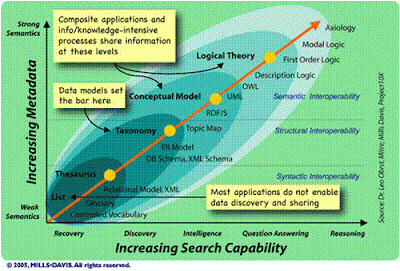
Story: A Day In The Life Of Jonathan Byte
[Scene opens: Jonathan Byte, an elite Web 3.0 programmer, is ready to start his day and we open the scene with him in his room ready to begin work.]
HAL: Hello Jonathan.
JON: Hello Hal, work configuration please.
[The computer wipes away the 3D World Of Warcraft 23 virtual playing field that fills the room in mid-air, made using the latest 3D projection technology, and replaces it with the Dynamic Marketplace interface to the Cognitive Abstraction Layer. Jon spreads out several floating 2D screens into different areas of the room to get a better glimpse of today’s offerings. He does this by using hand gestures with the help of the Nintendo Wii Reality Bridge, an interface much like the one seen in the science fiction movie, Minority Report.]
HAL: You’re in luck today. There are a large number of diagnostic requests in the marketplace today. Would you prefer locked or open bid offers?
JON: I’m feeling adventurous today. Show me open bid offers first, but only those that have a 90% probability of attracting no more than 5 competing programmers.
[In an open bid, any programmer can compete in real time for the job in a winner-take-all fashion. The first programmer that solves the problem or finishes the design task takes the specified payment with the others getting nothing. A locked bid offer is a request for programming help where the submitter commits to pay the subscribing programmer a specified fee, as long as the work is completed in the allotted time. Locked bids are lower risk and therefore pay a lot less.
 Open bid jobs are what keeps Web 3.0 commerce moving at maximum speed and makes many programmers rich in a short time. By examining the history of each programmer before allowing them to compete, the CAL will ensure that the group of programmers competing for an open bid have disparate problem solving approaches to the specified task request. This guarantees that the degree of healthy competition between ideas necessary to find an optimal solution exists, while avoiding wasteful effort that is truly redundant and varies only in a trivial manner. With a little help from HAL the jobs that Jonathan usually prefers are brought to his immediate attention.]
JON: Nice one Hal! I see you’ve found some diagnostic job requests that require a level 10 visual pattern recognition expert like myself, but don’t require extensive domain specific knowledge. Yesterday I had a task that required me to learn about intercity air traffic coordination before starting the job. I lost nearly a half hour of billable time reading about that stuff!
HAL: I’m always happy to help Jon.
JON: Pull up the job labeled “ADX-Omega 3” for me please, and quickly since it’s an open bid.
HAL: There will be a 5-minute delay before the Hypergeometric Data Visualizer (HDV) is available and prepped.
JON: Screw that. Jack up my HDV account to premium level 5 to get the time down to 30 seconds. I’ll pay the additional cost.
HAL: Based on previous experience you have a 75% chance of winning this bid, do you want to confirm the HDV premium usage fee?
JON: Confirmed, now move it, the clock is ticking!
[As part of Web 3.0, one of the most important underlying services is the Hypergeometric Data Visualizer or HDV. This technology is a breakthrough in program flow control and data traffic analysis. The HDV global servers can breakdown the N dimensional flow patterns of any software program, even if the application exists across a large number of different Web 2.0 style servers and user computer systems, and then convert the application quickly to a series of 3 dimensional moving displays digestible by the human eye and mind. Payment for access to the servers is negotiated in real time via the Dynamic Marketplace interface.]
HAL: The HDV is ready; do you want the usual colored wire frame display with filtering of non-relevant web elements and automatic motion freezing during important data traffic collisions?
JON: Yes Hal, thank you.
[Jon has chosen to do a diagnose and debug job today instead of a design task. A new set of screens spring into mid-air around Jon. It’s a wire frame representation of the program the user has assembled during complementary design sessions with their A.I. computer assistant. It resembles a giant city rendered in wire frame view like that in a graphic design package, except this city is alive with color-coded motion at a speed suited perfectly for Jon’s brain and visual pattern recognition capabilities. As per Jon’s personal taste, faster moving data traffic is being displayed as blue packets and slower ones are shaded red with a gradient of colors in between. These colored blobs of light whiz briskly along the wire frame city’s connecting pipes. With the help of their A.I. assistant the user has done a decent job of molding the application they desire, but there’s a problem. Under certain critical conditions the application fails. This is where Jon comes in.]
JON: Interesting. Hal, do you see the congestion in the blue area at Zeta (4, 7, 92) where the data packets are coming in from the yellow pipes?
HAL: Yes I do.
JON: Simulate a traffic load that is double the amount currently coming in from the yellow pipes in that sector.
[Immediately the activity from the yellow pipes speeds up and the packets change from a soft green to a troubling bright blue. The receiving orange spherical nodes, which represent servers processing the data, are pulsating in an unhealthy manner indicating that they can’t keep up with the traffic. What Jon doesn’t know, and doesn’t need to know, is that the yellow pipes are live sales data coming from cash register terminals in Spain that feed servers in the user’s Italian headquarters. It is now obvious that a surge of traffic coming from those feeds, due to periodic major sales promotions, is more than the company’s servers can handle. Jon will never know this, but the user is an Italian manufacturer with retail affiliates in Spain.]
JON: That’s it! When there’s a peak surge of traffic from those feeds the application’s receiving servers overload. Quick, recommend a doubling of capacity for those servers with a general suggestion to the user to stagger the data coming in from the yellow pipes in that sector.
HAL: Done! I’ve locked the solution and the user’s A.I. assistant has confirmed the solution as viable. You won the open bid and you just made $3000 in 15 minutes. I believe that’s a new record for you Jon.
JON: We make a good team Hal.
HAL: Thank you Jon.
[End Of Scene]
Notes On The Story
Many simplifications were made to portray this story. The data being represented could have been shown in a topological map style, or a 3D audio soundscape representation augmented by touch (haptic) peripherals, or any number of different ways. Rather than data traffic packets it could have been CPU threads, parallel execution paths, database replication patterns, or anything else. In addition, the real life data traffic patterns perceived by Jonathan would be far more complex than the simple e-commerce scenario given.

From The Abstract To The Concrete And Back Again
An important linguistics task performed by Web 3.0 A.I. assistants is the conversion of abstracted concepts back to the correct domain specific language that is appropriate for any particular user. Jonathan’s recommendation to the user regarding “the data coming in from the yellow pipes” would be translated into the appropriate concepts and ideas that pertain to the user’s actual application. For example, his suggestion to “stagger the data” might result in the user’s A.I. assistant suggesting that the Italian company should schedule upcoming sales events with enough time between them so as not to overload the point of sale equipment. Semantic Web software agents would handle this translation task but these software agents would not be the ultra-powerful A.I. systems that we will someday have when the Singularity arrives. Web 3.0 will make sure we don’t have to wait that long. They too would be assisted in real time by human elements that would be shunted in to handle the difficult parts of the translation, with the salient parts of the linguistic translations catalogued for later usage in future machine to human conversations.
The Virtualization Of Human Knowledge In Real Time
The important point is that once we “virtualize” the ability to represent web program execution and data traffic patterns, and then shunt in human intelligence at the very moment it is required to do the complex pattern recognition work computers currently can’t do, we will exponentially increase our ability to help each other solve problems and reduce the amount of unnecessary duplication of effort currently plaguing us in our pre Web 3.0 world. When the technology pioneered by Amazon with the Mechanical Turk service is enhanced by A.I. and is built into the very fabric of Web 3.0, it will advance our collective problem solving capability to a vastly more powerful level. This will allow us to truly leverage the skills and talents of every individual and distribute those skills at light speed on a global scale.
Global Leveraging Of Human Talent
Right now there are web designers that are forced to program and programmers that are forced to do user interface work. This is work that neither party wants to do and that could be better handled by the other. It’s not hard to extend that premise to millions of different jobs everywhere across every industry group there is. In addition, all of us are burdened and bogged down with the scheduling, management, and coordination of work between people; much of which is an unnecessary duplication of effort and requires slow painful interfacing during cumbersome meetings. Web 3.0 will radically eliminate and revolutionize much of that. We’ll still have meetings, but they will be much more fun and creative. We’re people, we will always like to meet.
One of the huge benefits of the virtualization of software development and the modularizing of human intelligence will be the automated cataloging and reuse of solutions. Since all parts of the development process will be codified, the Cognitive Abstraction Layer can record the vital statistics of each problem solved and keep track of which people and skill sets were involved, what recommendations were made, and what solutions best suited the problem. Therefore, when a similar problem is encountered again, these solutions can be offered and tried out in both simulation and real time to be provided to other users that encounter the same problem. In addition, job notifications will be automatically routed via their A.I. assistants to the people that have the most relevant skill sets.
Closing Words
The new distributed problem-solving paradigm described in this article will be a quantum leap in the reduction of duplicate effort currently occurring in our civilization, further accelerating exponentially the current rate of technological progress. As I type this document my Word processor is making advanced grammar and structure recommendations in real time. In the near future a physics teacher, a poet, or a legion of other people with different skill sets will help me create my next document, most of whom I will never meet. My A.I. assistant will present their knowledge to me at the exact moment it is needed and in the correct context.
I leave it to the reader to see how these core Web 3.0 advancements can be transposed and applied to many other fields, well outside that of software development. In addition, a quick search on the Web regarding new computer interface methods will turn up exciting new interfaces to spark your imagination such as brainwave scanners and more. In later articles in this series I will take a look at how artificial intelligence will evolve to enable these advancements and provide the supporting and binding elements of a brave new Web. I do not know how long it will take us to get from Web 3.0 to the first A.I. supercomputer that will mark the start of the Singularity. That is a question for someone with a much bigger brain than mine to answer, someone like Ray Kurzweil or David Gelernter. I suggest you watch the debate on machine consciousness they recently had to see these two great minds at work.
Who's really using web apps, and why?
In my work at Rubicon, we spend much of our time helping tech companies with strategy and product planning. One recurring theme is the impact of web applications. We help web app companies figure out their customers and product plans, and we help traditional tech companies understand web apps and what to do about them.
As we do this work, we repeatedly run into a lack of basic information about how web apps are being used -- how many people use them, who uses them, which apps they use, and so on. There's a lot of anecdotal information from individual web companies on how they're doing, but almost nothing on the usage of web apps across the industry as a whole.
So we decided to fill that hole. This summer we did a survey of about 2,000 US adult PC owners on their usage of web applications. We released the results this morning at the AjaxWorld conference. Some highlights:
--37% of US home PC owners use at least one web application on a regular basis. Usage has already spread far beyond early adopters.
--Usage varies dramatically by app category. E-mail and games are the two most popular web app categories, but some other categories (such as online word processing) have very low adoption so far.
--College students are more enthusiastic adopters of web apps than non-students. More than 50% of college students use at least one web app regularly.
To me, the study was a good reminder of the practicality of most PC users. Although we in the industry worry a lot about the technical distinctions between things like web apps and packaged applications, most users don't care. They just want to solve their problems and get on with their lives. If a web app is better or cheaper than a packaged app, they will use it. If it isn't better in some way, they won't.
If you're working at a web app company and want to create a popular service, be sure you solve a real world problem that people care about. The doors are wide open if you do that.
If you work at a traditional software company and think you're immune to competition from web apps, or that it'll take years for them to affect you, you're living in fantasyland. For about 70% of US PC owners, there are no significant barriers to adoption of web apps.
There's a lot more analysis (and graphs of the findings) in the full report on the Rubicon website. Check it out here.And there's some interesting commentary about the study here and here and here and here.
As we do this work, we repeatedly run into a lack of basic information about how web apps are being used -- how many people use them, who uses them, which apps they use, and so on. There's a lot of anecdotal information from individual web companies on how they're doing, but almost nothing on the usage of web apps across the industry as a whole.
So we decided to fill that hole. This summer we did a survey of about 2,000 US adult PC owners on their usage of web applications. We released the results this morning at the AjaxWorld conference. Some highlights:
--37% of US home PC owners use at least one web application on a regular basis. Usage has already spread far beyond early adopters.
--Usage varies dramatically by app category. E-mail and games are the two most popular web app categories, but some other categories (such as online word processing) have very low adoption so far.
--College students are more enthusiastic adopters of web apps than non-students. More than 50% of college students use at least one web app regularly.
To me, the study was a good reminder of the practicality of most PC users. Although we in the industry worry a lot about the technical distinctions between things like web apps and packaged applications, most users don't care. They just want to solve their problems and get on with their lives. If a web app is better or cheaper than a packaged app, they will use it. If it isn't better in some way, they won't.
If you're working at a web app company and want to create a popular service, be sure you solve a real world problem that people care about. The doors are wide open if you do that.
If you work at a traditional software company and think you're immune to competition from web apps, or that it'll take years for them to affect you, you're living in fantasyland. For about 70% of US PC owners, there are no significant barriers to adoption of web apps.
There's a lot more analysis (and graphs of the findings) in the full report on the Rubicon website. Check it out here.And there's some interesting commentary about the study here and here and here and here.
What's more insecure, the iPhone or Apple?
It's been interesting to watch the reactions to Apple's crackdown on people who hack their iPhones.
If you've been living in a cave or otherwise off the net, I should explain that Apple's latest software update for the iPhone tends to disable phones that have been hacked to undo the SIM lock (enabling them to make calls on other networks) or to install third party applications. In some cases, Apple has refused to repair the software in these "bricked" phones, forcing the user to buy a new one.
I've read contradictory reports on what level of hacking causes the iPhone to be disabled. Some reports say the update disables the phone only if the SIM lock has been broken. In phones with an intact SIM lock but third party applications, word is that the update "merely" erases the apps without disabling the phone. But the fear among iPhone users is that doing anything unauthorized with the phone, even installing an app, can cause it to be disabled. Apple appears to be feeding this fear deliberately.
This has stopped (at least temporarily) the rapid growth of third party applications that developers and enthusiasts had started creating for the iPhone. Although Apple doesn't endorse or encourage the creation of native apps for the iPhone, developers had quickly found ways to access the modified version of Mac OS X inside the iPhone, and were busily producing a series of interesting and cute add-ons.

I was astounded by the speed at which iPhone applications were appearing. Usually it takes about six months to get developers cranked up on a new device, and that's when things are going well. Just three months after the first shipment of the iPhone, there were already a lot of interesting apps appearing, and David Pogue at the New York Times had even created a video celebrating them.
Most technology companies would kill to have that publicity and a bunch of third parties creating new software for their products. Web 2.0 companies are all adding application interfaces so they can get developers, companies like Adobe, Microsoft, and Google are competing aggressively to create APIs for web development, and even Apple invests heavily in encouraging developers to create software for the Mac.
The assault on hacked iPhones has provoked a nasty reaction online, starting among enthusiasts (check out the video here) and now spreading to the mainstream press. The latest example, pointed out to me by Chris Dunphy (an angry iPhone user), is from BusinessWeek.
"Wasn't Apple itself the creation of two guys in garage with a knack for making interesting ideas into real things? So why punish the people who try to create something interesting, threatening them with the prospect of an inoperative phone?....The company that styles itself as the technology supplier of choice for creative people with great ideas is insisting that to own its products is to accept a defined orthodoxy where there's only one acceptable way to do things. That doesn't sound like the Apple I know. So I'm not going to buy an iPhone. And until Apple commits to changing this ridiculous policy, I don't think you should either."
I can't remember the last time someone at BusinessWeek actively campaigned against a product of any sort.
Why would Apple expose itself to so much criticism?
The weirdest thing about this whole saga is that it's not at all clear why Apple is putting itself through it. I've been asking myself that a lot, and want to share some thoughts.
The first thing I think we have to do is separate the SIM lock issue from the applications issue. They are two very different business and technical issues, and Apple may have completely different motivations for pursuing them.
Why defend the SIM lock? Many mobile phones, especially in the US, are locked for use on a particular network. All CDMA phones outside of China are like this (because there is no SIM card), and many GSM phones in the US are as well. The excuse for this is usually that the operator paid a subsidy for the phone hardware, and needs to recover the subsidy through service charges. But the operators also achieve this recovery through big cancellation fees if you switch operators before the contract is up, so the industry has not traditionally worked very hard to defend the SIM lock. Unlock codes for many phones are available online, and many operators will reportedly unlock your phone if you call them and say that you're traveling overseas.
Apple is the first phone hardware vendor that I've seen aggressively defend the SIM lock, and I'm not sure why. The most common explanation on the Web is that Apple's getting a revenue share on the monthly billings from iPhone users, so it actually loses a lot of money when any iPhone moves to another network. There is also speculation that if iPhones can be moved into countries where they are not available, Apple will have trouble extracting lots of money from local operators who sign up to carry the phone.
The latter explanation doesn't hold a lot of water for me -- most people want their phone to work in their native language, so an English-language version of the iPhone is not going to destroy the market for a legitimate iPhone in France. Also, iPhones moved onto unauthorized networks lose some of their cool features, such as the visual voicemail function. If Apple were selling iPhones in some countries for $99 and in others for $699, I would see more of a gray market threat, but the price gaps are not nearly that large. Combine the language issue, loss of features, and low opportunity for price arbitrage, and I don't think there is enough motivation for Apple to subject itself to the abuse it's taking.
But the revenue opportunity is a different thing. If Apple got, say, 20% of the mobile billings for an authorized iPhone, that would probably be about $120 a year from an average user -- in pure profit. That's going to be similar to the total margins Apple makes on the actual iPhone, and they get the billings every year. I have no idea if Apple's actually getting 20%, but that sort of number has been rumored for some of the European iPhone deals. Even if Apple's cut is only $10%, the revenue share would be a huge part of Apple's total profit on the iPhone, and something they would be willing to defend vigorously, even if it pisses people off.
Why kill third party applications? This one is harder to understand, because I don't understand what Apple gains from it. Having applications for the iPhone makes it more popular, and also sucks up developer activity that could go to competing products. My first reaction when I heard that Apple wouldn't allow applications on the iPhone was that it was a control issue for Steve Jobs - he watched the base of cool Mac developers get sucked away by Windows, and never wants to be vulnerable to a third party again.
There are a lot of commentators online who assume the control freak attitude is driving Apple's behavior on the iPhone. Others speculate that Apple is planning to offer a third party applications store, in which it will take a large revenue cut for third party applications that have been approved by Apple. I have no idea what the cut would be, so it's hard to say how much it's worth to Apple. But I think if it were a big part of their plans, they would have made that store available on the first version of the device. So although I believe they might create such a store (it's an obvious thing to do), I don't think that is the whole explanation. It's hard for me to see them bringing this level of criticism on themselves just to defend that hypothetical store.
Instead, I'm starting to suspect that they have a deeper motivation that they don't want to discuss in public because even acknowledging it could damage iPhone sales. It's better to take criticism from people who think you're evil than to admit that your device has a serious flaw, and I think maybe the security structure of the iPhone is a serious flaw.
When the iPhone was announced, Steve Jobs said it didn't allow third party apps because they could bring down the phone network. I thought that was stupid bluster at the time, because on most smartphones it's very difficult to do anything really nasty to the network. The applications and the phone run on separate processors, and given the limitations of the smartphone operating systems, it's very difficult to do anything really heinous to the network.
But the iPhone has a much more powerful OS in it, a derivative of Unix. The reports posted online by hackers who have played with the innards of the iPhone are very disturbing (link). Here's a great example:
EDGE network access is horribly slow, but it works....I made a few attempts to discover other hosts in the private address space, in hopes of finding other EDGE devices, but instead only found a few scattered routers, switches, and servers.
So the hacker was looking to hack other phones via AT&T's Edge network, and was not able to do so. That's a good thing from the perspective of the average user. But you have to wonder what those "scattered routers, switches, and servers" are. I doubt AT&T deploys switches and servers on its network just for laughs, so who knows how important they are to the functioning of the network, or how secure they are. I'm sure they were not set up with the expectation that hackers would be tickling them from an iPhone.
If you know the technical details of Edge and have any thoughts on this, please post a comment. Maybe I'm overstating the risk here. My personal reaction was that if I worked at an operator and read the quote above, my hair would stand on end (if I still had any).
Here's another interesting quote:
Every process runs as root. MobileSafari, MobileMail, even the Calculator, all run with full root privileges. Any security flaw in any iPhone application can lead to a complete system compromise. A rootkit takes on a whole new meaning when the attacker has access to the camera, microphone, contact list, and phone hardware. Couple this with "always-on" internet access over EDGE and you have a perfect spying device.
Well, that's pretty straightforward. There are already third party applications that turn a smart phone into a spying device, but you need physical access to that particular device in order to install them. The difference with the iPhone, according to this report, is that once you find a security hole you could install that sort of spyware remotely, via the wireless connection.
That led to a Computerworld article which says basically that viruses and other malware could spread from one iPhone directly to another without the user ever being aware of it (link). I'm not too alarmed by that just yet, because there isn't a critical mass of iPhones in any one geographic location to infect each other. But it could be interesting the next time there's a big gathering of iPhone users. Macworld, anyone?
To me the more troubling part of the report was the root privileges thing. I'm not a Unix expert, so I talked to someone who is. He confirmed that applications with root privileges in Unix can do just about anything. Unix is designed to empower programmers, and the assumption is that someone with root access knows what they are doing and can be trusted. (You can read some similar commentary in a eWeek column here).
There are ways to prevent third party applications from having root access, but the disturbing possibility (and I'm speculating here) is that Apple may have stripped out those protections in order to reduce the memory requirements of the iPhone and make it run faster. If that's the case, my friend said, it may be a pretty involved project for Apple to add those protections back in. Not at all impossible, but requiring a lot of work and time.
Through my years in the industry, I've done a lot of research on technology users. One of the things I've learned is that security problems are a great way to scare people away from a new technology device. If it even sounds insecure, a lot of people will stay away from it. Based on what I'm seeing online, there is a lot of evidence that the iPhone as currently structured is a genuinely insecure device once any uncontrolled third party applications get onto it. What's more, keeping third party apps off your own iPhone does not necessarily protect you, because malicious software could propagate from device to device.
If I were working at Apple, and this were the situation, what would I do? Well, first I would not want to acknowledge the vulnerability, because that itself would scare away customers. Second, I would do everything in my power to shut down all third party native application development. Squash it, kill it completely. And I'd be willing to take a lot of criticism for doing so because the alternative, acknowledging the security problem, would produce even more bad PR.
Let me be very clear here: I'm not saying that I know this is what's going on at Apple; I don't. And I'm not trying to start any nasty rumors (they are already out there). I should also point out that some reports on iPhone security have been a lot less alarmist (for example, here is Symantec's take from early July). But that was before the latest reports surfaced.
I think we need to ask whether Apple botched the security of the iPhone in the belief that people wouldn't try to add apps to it. They could easily have made that assumption; there have been comparatively few efforts to add apps to the iPod, after all. But the publicity for the iPhone, and Apple's bragging that OS X was in it, made it an irresistible target for hacking.
If Apple really does have a security problem in the iPhone, I don't think they will be able to keep it quiet. Experience shows that the best approach in this sort of situation is to come clean about the problem, take your lumps, and fix it as soon as you can. That way you at least retain your reputation for honesty. If the iPhone really is vulnerable, Apple risks ending up with the worst of all possible worlds -- it'll damage its reputation for honesty, piss off a lot of technophiles, and people will still hear that the iPhone is insecure.
It will be interesting to see how Apple handles this issue in the weeks to come.
If you've been living in a cave or otherwise off the net, I should explain that Apple's latest software update for the iPhone tends to disable phones that have been hacked to undo the SIM lock (enabling them to make calls on other networks) or to install third party applications. In some cases, Apple has refused to repair the software in these "bricked" phones, forcing the user to buy a new one.
I've read contradictory reports on what level of hacking causes the iPhone to be disabled. Some reports say the update disables the phone only if the SIM lock has been broken. In phones with an intact SIM lock but third party applications, word is that the update "merely" erases the apps without disabling the phone. But the fear among iPhone users is that doing anything unauthorized with the phone, even installing an app, can cause it to be disabled. Apple appears to be feeding this fear deliberately.
This has stopped (at least temporarily) the rapid growth of third party applications that developers and enthusiasts had started creating for the iPhone. Although Apple doesn't endorse or encourage the creation of native apps for the iPhone, developers had quickly found ways to access the modified version of Mac OS X inside the iPhone, and were busily producing a series of interesting and cute add-ons.
I was astounded by the speed at which iPhone applications were appearing. Usually it takes about six months to get developers cranked up on a new device, and that's when things are going well. Just three months after the first shipment of the iPhone, there were already a lot of interesting apps appearing, and David Pogue at the New York Times had even created a video celebrating them.
Most technology companies would kill to have that publicity and a bunch of third parties creating new software for their products. Web 2.0 companies are all adding application interfaces so they can get developers, companies like Adobe, Microsoft, and Google are competing aggressively to create APIs for web development, and even Apple invests heavily in encouraging developers to create software for the Mac.
The assault on hacked iPhones has provoked a nasty reaction online, starting among enthusiasts (check out the video here) and now spreading to the mainstream press. The latest example, pointed out to me by Chris Dunphy (an angry iPhone user), is from BusinessWeek.
"Wasn't Apple itself the creation of two guys in garage with a knack for making interesting ideas into real things? So why punish the people who try to create something interesting, threatening them with the prospect of an inoperative phone?....The company that styles itself as the technology supplier of choice for creative people with great ideas is insisting that to own its products is to accept a defined orthodoxy where there's only one acceptable way to do things. That doesn't sound like the Apple I know. So I'm not going to buy an iPhone. And until Apple commits to changing this ridiculous policy, I don't think you should either."
I can't remember the last time someone at BusinessWeek actively campaigned against a product of any sort.
Why would Apple expose itself to so much criticism?
The weirdest thing about this whole saga is that it's not at all clear why Apple is putting itself through it. I've been asking myself that a lot, and want to share some thoughts.
The first thing I think we have to do is separate the SIM lock issue from the applications issue. They are two very different business and technical issues, and Apple may have completely different motivations for pursuing them.
Why defend the SIM lock? Many mobile phones, especially in the US, are locked for use on a particular network. All CDMA phones outside of China are like this (because there is no SIM card), and many GSM phones in the US are as well. The excuse for this is usually that the operator paid a subsidy for the phone hardware, and needs to recover the subsidy through service charges. But the operators also achieve this recovery through big cancellation fees if you switch operators before the contract is up, so the industry has not traditionally worked very hard to defend the SIM lock. Unlock codes for many phones are available online, and many operators will reportedly unlock your phone if you call them and say that you're traveling overseas.
Apple is the first phone hardware vendor that I've seen aggressively defend the SIM lock, and I'm not sure why. The most common explanation on the Web is that Apple's getting a revenue share on the monthly billings from iPhone users, so it actually loses a lot of money when any iPhone moves to another network. There is also speculation that if iPhones can be moved into countries where they are not available, Apple will have trouble extracting lots of money from local operators who sign up to carry the phone.
The latter explanation doesn't hold a lot of water for me -- most people want their phone to work in their native language, so an English-language version of the iPhone is not going to destroy the market for a legitimate iPhone in France. Also, iPhones moved onto unauthorized networks lose some of their cool features, such as the visual voicemail function. If Apple were selling iPhones in some countries for $99 and in others for $699, I would see more of a gray market threat, but the price gaps are not nearly that large. Combine the language issue, loss of features, and low opportunity for price arbitrage, and I don't think there is enough motivation for Apple to subject itself to the abuse it's taking.
But the revenue opportunity is a different thing. If Apple got, say, 20% of the mobile billings for an authorized iPhone, that would probably be about $120 a year from an average user -- in pure profit. That's going to be similar to the total margins Apple makes on the actual iPhone, and they get the billings every year. I have no idea if Apple's actually getting 20%, but that sort of number has been rumored for some of the European iPhone deals. Even if Apple's cut is only $10%, the revenue share would be a huge part of Apple's total profit on the iPhone, and something they would be willing to defend vigorously, even if it pisses people off.
Why kill third party applications? This one is harder to understand, because I don't understand what Apple gains from it. Having applications for the iPhone makes it more popular, and also sucks up developer activity that could go to competing products. My first reaction when I heard that Apple wouldn't allow applications on the iPhone was that it was a control issue for Steve Jobs - he watched the base of cool Mac developers get sucked away by Windows, and never wants to be vulnerable to a third party again.
There are a lot of commentators online who assume the control freak attitude is driving Apple's behavior on the iPhone. Others speculate that Apple is planning to offer a third party applications store, in which it will take a large revenue cut for third party applications that have been approved by Apple. I have no idea what the cut would be, so it's hard to say how much it's worth to Apple. But I think if it were a big part of their plans, they would have made that store available on the first version of the device. So although I believe they might create such a store (it's an obvious thing to do), I don't think that is the whole explanation. It's hard for me to see them bringing this level of criticism on themselves just to defend that hypothetical store.
Instead, I'm starting to suspect that they have a deeper motivation that they don't want to discuss in public because even acknowledging it could damage iPhone sales. It's better to take criticism from people who think you're evil than to admit that your device has a serious flaw, and I think maybe the security structure of the iPhone is a serious flaw.
When the iPhone was announced, Steve Jobs said it didn't allow third party apps because they could bring down the phone network. I thought that was stupid bluster at the time, because on most smartphones it's very difficult to do anything really nasty to the network. The applications and the phone run on separate processors, and given the limitations of the smartphone operating systems, it's very difficult to do anything really heinous to the network.
But the iPhone has a much more powerful OS in it, a derivative of Unix. The reports posted online by hackers who have played with the innards of the iPhone are very disturbing (link). Here's a great example:
EDGE network access is horribly slow, but it works....I made a few attempts to discover other hosts in the private address space, in hopes of finding other EDGE devices, but instead only found a few scattered routers, switches, and servers.
So the hacker was looking to hack other phones via AT&T's Edge network, and was not able to do so. That's a good thing from the perspective of the average user. But you have to wonder what those "scattered routers, switches, and servers" are. I doubt AT&T deploys switches and servers on its network just for laughs, so who knows how important they are to the functioning of the network, or how secure they are. I'm sure they were not set up with the expectation that hackers would be tickling them from an iPhone.
If you know the technical details of Edge and have any thoughts on this, please post a comment. Maybe I'm overstating the risk here. My personal reaction was that if I worked at an operator and read the quote above, my hair would stand on end (if I still had any).
Here's another interesting quote:
Every process runs as root. MobileSafari, MobileMail, even the Calculator, all run with full root privileges. Any security flaw in any iPhone application can lead to a complete system compromise. A rootkit takes on a whole new meaning when the attacker has access to the camera, microphone, contact list, and phone hardware. Couple this with "always-on" internet access over EDGE and you have a perfect spying device.
Well, that's pretty straightforward. There are already third party applications that turn a smart phone into a spying device, but you need physical access to that particular device in order to install them. The difference with the iPhone, according to this report, is that once you find a security hole you could install that sort of spyware remotely, via the wireless connection.
That led to a Computerworld article which says basically that viruses and other malware could spread from one iPhone directly to another without the user ever being aware of it (link). I'm not too alarmed by that just yet, because there isn't a critical mass of iPhones in any one geographic location to infect each other. But it could be interesting the next time there's a big gathering of iPhone users. Macworld, anyone?
To me the more troubling part of the report was the root privileges thing. I'm not a Unix expert, so I talked to someone who is. He confirmed that applications with root privileges in Unix can do just about anything. Unix is designed to empower programmers, and the assumption is that someone with root access knows what they are doing and can be trusted. (You can read some similar commentary in a eWeek column here).
There are ways to prevent third party applications from having root access, but the disturbing possibility (and I'm speculating here) is that Apple may have stripped out those protections in order to reduce the memory requirements of the iPhone and make it run faster. If that's the case, my friend said, it may be a pretty involved project for Apple to add those protections back in. Not at all impossible, but requiring a lot of work and time.
Through my years in the industry, I've done a lot of research on technology users. One of the things I've learned is that security problems are a great way to scare people away from a new technology device. If it even sounds insecure, a lot of people will stay away from it. Based on what I'm seeing online, there is a lot of evidence that the iPhone as currently structured is a genuinely insecure device once any uncontrolled third party applications get onto it. What's more, keeping third party apps off your own iPhone does not necessarily protect you, because malicious software could propagate from device to device.
If I were working at Apple, and this were the situation, what would I do? Well, first I would not want to acknowledge the vulnerability, because that itself would scare away customers. Second, I would do everything in my power to shut down all third party native application development. Squash it, kill it completely. And I'd be willing to take a lot of criticism for doing so because the alternative, acknowledging the security problem, would produce even more bad PR.
Let me be very clear here: I'm not saying that I know this is what's going on at Apple; I don't. And I'm not trying to start any nasty rumors (they are already out there). I should also point out that some reports on iPhone security have been a lot less alarmist (for example, here is Symantec's take from early July). But that was before the latest reports surfaced.
I think we need to ask whether Apple botched the security of the iPhone in the belief that people wouldn't try to add apps to it. They could easily have made that assumption; there have been comparatively few efforts to add apps to the iPod, after all. But the publicity for the iPhone, and Apple's bragging that OS X was in it, made it an irresistible target for hacking.
If Apple really does have a security problem in the iPhone, I don't think they will be able to keep it quiet. Experience shows that the best approach in this sort of situation is to come clean about the problem, take your lumps, and fix it as soon as you can. That way you at least retain your reputation for honesty. If the iPhone really is vulnerable, Apple risks ending up with the worst of all possible worlds -- it'll damage its reputation for honesty, piss off a lot of technophiles, and people will still hear that the iPhone is insecure.
It will be interesting to see how Apple handles this issue in the weeks to come.
Design Piracy - when your designs are stolen

It’s happened to the best of us and will inevitably happen to you if it hasn’t already. Your hard work and creativity are ripped off without consent, permission, payment, or even credit. Oftentimes the idiot who assembled a piece of garbage like you see above will take credit for the design entirely. You’ll even see fans of the band compliment the “poster” with remarks like “Wow, you’re really talented, you should make a flyer for me!” Or even “I always knew you could draw!”
The image above was a close recreation of a poster that some band on Myspace made using Go Media’s artwork as their “attention grabber.” Their typography was horrid and it made me want to barf. My first instinct was to be all super pissed off and flame the person who created this trash!
The Small Time Crook
 But then I sat back and took a deep breath. Was this as big of a deal as I thought? It was some band with less than 1,000 total plays and only a few hundred friends. They weren’t any good and were probably just a group of young kids who are fans of our designs. I didn’t want to sound like a complete asshole when I messaged them so I simply said “Woah, sweet design who made it?” The wrote back and said “A friend of mine created it…” Haha.
So what this kid just lying about it? Or did he have a friend make the poster and the friend stole it without the band even knowing? I wrote back and asked for the guy who created it, and he wrote back and said “Woah, I didn’t know that this was something you created. Sorry about that! I’ll take it down right away.” I didn’t even have to ask them to remove it. He was smart enough to notice my profile and portfolio and saw the original artwork in it. He must have got the hint!
This is typical of most cases of design piracy online. Small time, no-name designers wanting to use a cool piece of art for their own. They always say imitation is the sincerest form of flattery right? I try to keep that in mind when “policing” any stolen art. Other examples are teens on Myspace who use your artwork for their backgrounds or profile images. I’ve seen a design I made years ago for a client on various “Pimp Your Myspace” type sites making the artwork available to non-designers all over. The client I did it for paid me for my time and it’s as much his concern as it is mine. But I don’t bother policing stuff like that because I don’t see any of it as a real threat. It’s mostly just fans using some cool graphics to make themselves stand out amongst their friends. No harm done there.
So what can you do when this happens to your designs? If it really bothers you, you can simply send the person a message if you can and politely ask. Tell them who you are and why it’s important that they remove it. Don’t threaten them in the original email. If you’re cool about it, chances are they will be cool about it too. And if they take it down right away, make sure to thank them nicely. If they refuse, that’s when you can start to threaten them with legal action. That usually does the trick for the small time crooks.
The Wannabe Designer
 Sometimes you’ll have another designer that completely steals your work and puts it in his or her portfolio as if they had created it themselves. This is shady business and at some point, you know that the designer is going to be called out on it. When stealing from an established firm such as Go Media, chances are people will recognize Go Media’s work in someone else’s portfolio and ask us about it. When this happens, I contact the designer right away and ask them what they are doing and why. I ask them to remove it and more often than not they do. No questions asked.
Now, you think to yourself, what is this person trying achieve? If they have to resort to stealing other people’s artwork to make themselves look good and get hired, you have to question the person’s skill level, intelligence, and perceived longevity in the design field. Most likely, the designer is not a threat to anyone and is going to run themselves out of business.
What to do? If this happens to you, make sure you get the culprit to remove the artwork immediately. Email or phone call works best. Be polite, not mean or arrogant. Only apply pressure when they appear to be resisting. Most people will immediately take it down if caught. As far as legal action goes, it’s not worth it to even try. Say they got hired to do a $20,000 website because of some high quality Go Media art in their portfolio… Eventually they’re not going to be able to hold up their end of the bargain and they’ll fail. It’s a waste of your time to take it any further unless they are repeat offenders.
Ripping your designs and selling them as their own
 This gets a little more serious. Say for example, you have a t-shirt design you made. Some new clothing company decides to copy your image outright and print the design and sell it. Or even they might recreate it themselves, but it’s obvious the images are nearly identical. This is where some legal action might be a good idea, but in most cases, it’s not even worth your time to pursue it. A lawyer will tell you that you’ll spend more money on legal fees than anything you’d make from the poor startup clothing company. At best, you send a Cease and Desist letter in addition to an email or phone call explaining your feelings towards the matter.
If it’s a large scale company that rips your designs (which DOES happen!) you have a case. This happened when Johnny Cupcakes was commissioned to design some shirts for Urban Outfitters. They rejected his designs and then released shirts very similar to what he created. I’m not exactly sure what happened in the end, but you’ll be hard pressed to find a lawyer who doesn’t want to go after a “big fish.”
What do I do?
So if this happens to you, you probably have a legal case and it could be worth your time to pursue it.
Blatant Ripping and Profiting
 In the case of our vector packs, we are frequently notified by our own customers when they see someone on the net illegally sharing or distributing our products. This is a little different than someone ripping off our design. This is very similiar to downloading software or movies. It’s a digital file that we are selling to customers. That income becomes revenue that we use to pay our employees and grow our company. When people are stealing and sharing and in some cases even selling, it directly hurts our sales. We DO see a dip in sales when stuff like this happens. But when you try to contact the website, and it’s in Russian or Hebrew, it’s tough to get a response out of it. You have to kind of assume people will be pirating your digital files if there is any sort of value to them.
What do you do?
Most cases, you can simply report abuse or contact the site owner and politely ask for them to remove the link. That usually works. If not, be persistant. I have a friend who runs a Type Foundry and their fonts are always being pirated. He has since started an anti-piracy coalition online and gathered a team of creatives to help him fight it. I’m not sure if it’s working, but it’s a good start!
The image above was a close recreation of a poster that some band on Myspace made using Go Media’s artwork as their “attention grabber.” Their typography was horrid and it made me want to barf. My first instinct was to be all super pissed off and flame the person who created this trash!
The Small Time Crook
 But then I sat back and took a deep breath. Was this as big of a deal as I thought? It was some band with less than 1,000 total plays and only a few hundred friends. They weren’t any good and were probably just a group of young kids who are fans of our designs. I didn’t want to sound like a complete asshole when I messaged them so I simply said “Woah, sweet design who made it?” The wrote back and said “A friend of mine created it…” Haha.
So what this kid just lying about it? Or did he have a friend make the poster and the friend stole it without the band even knowing? I wrote back and asked for the guy who created it, and he wrote back and said “Woah, I didn’t know that this was something you created. Sorry about that! I’ll take it down right away.” I didn’t even have to ask them to remove it. He was smart enough to notice my profile and portfolio and saw the original artwork in it. He must have got the hint!
This is typical of most cases of design piracy online. Small time, no-name designers wanting to use a cool piece of art for their own. They always say imitation is the sincerest form of flattery right? I try to keep that in mind when “policing” any stolen art. Other examples are teens on Myspace who use your artwork for their backgrounds or profile images. I’ve seen a design I made years ago for a client on various “Pimp Your Myspace” type sites making the artwork available to non-designers all over. The client I did it for paid me for my time and it’s as much his concern as it is mine. But I don’t bother policing stuff like that because I don’t see any of it as a real threat. It’s mostly just fans using some cool graphics to make themselves stand out amongst their friends. No harm done there.
So what can you do when this happens to your designs? If it really bothers you, you can simply send the person a message if you can and politely ask. Tell them who you are and why it’s important that they remove it. Don’t threaten them in the original email. If you’re cool about it, chances are they will be cool about it too. And if they take it down right away, make sure to thank them nicely. If they refuse, that’s when you can start to threaten them with legal action. That usually does the trick for the small time crooks.
The Wannabe Designer
 Sometimes you’ll have another designer that completely steals your work and puts it in his or her portfolio as if they had created it themselves. This is shady business and at some point, you know that the designer is going to be called out on it. When stealing from an established firm such as Go Media, chances are people will recognize Go Media’s work in someone else’s portfolio and ask us about it. When this happens, I contact the designer right away and ask them what they are doing and why. I ask them to remove it and more often than not they do. No questions asked.
Now, you think to yourself, what is this person trying achieve? If they have to resort to stealing other people’s artwork to make themselves look good and get hired, you have to question the person’s skill level, intelligence, and perceived longevity in the design field. Most likely, the designer is not a threat to anyone and is going to run themselves out of business.
What to do? If this happens to you, make sure you get the culprit to remove the artwork immediately. Email or phone call works best. Be polite, not mean or arrogant. Only apply pressure when they appear to be resisting. Most people will immediately take it down if caught. As far as legal action goes, it’s not worth it to even try. Say they got hired to do a $20,000 website because of some high quality Go Media art in their portfolio… Eventually they’re not going to be able to hold up their end of the bargain and they’ll fail. It’s a waste of your time to take it any further unless they are repeat offenders.
Ripping your designs and selling them as their own
 This gets a little more serious. Say for example, you have a t-shirt design you made. Some new clothing company decides to copy your image outright and print the design and sell it. Or even they might recreate it themselves, but it’s obvious the images are nearly identical. This is where some legal action might be a good idea, but in most cases, it’s not even worth your time to pursue it. A lawyer will tell you that you’ll spend more money on legal fees than anything you’d make from the poor startup clothing company. At best, you send a Cease and Desist letter in addition to an email or phone call explaining your feelings towards the matter.
If it’s a large scale company that rips your designs (which DOES happen!) you have a case. This happened when Johnny Cupcakes was commissioned to design some shirts for Urban Outfitters. They rejected his designs and then released shirts very similar to what he created. I’m not exactly sure what happened in the end, but you’ll be hard pressed to find a lawyer who doesn’t want to go after a “big fish.”
What do I do?
So if this happens to you, you probably have a legal case and it could be worth your time to pursue it.
Blatant Ripping and Profiting
 In the case of our vector packs, we are frequently notified by our own customers when they see someone on the net illegally sharing or distributing our products. This is a little different than someone ripping off our design. This is very similiar to downloading software or movies. It’s a digital file that we are selling to customers. That income becomes revenue that we use to pay our employees and grow our company. When people are stealing and sharing and in some cases even selling, it directly hurts our sales. We DO see a dip in sales when stuff like this happens. But when you try to contact the website, and it’s in Russian or Hebrew, it’s tough to get a response out of it. You have to kind of assume people will be pirating your digital files if there is any sort of value to them.
What do you do?
Most cases, you can simply report abuse or contact the site owner and politely ask for them to remove the link. That usually works. If not, be persistant. I have a friend who runs a Type Foundry and their fonts are always being pirated. He has since started an anti-piracy coalition online and gathered a team of creatives to help him fight it. I’m not sure if it’s working, but it’s a good start!
Rule Three: Contrast, Contrast, Contrast
Part Three of Seven Easy Principles to Becoming a Master Designer.

Good contrast in your design goes hand-in-hand with your color selections. Contrast is the value difference between the colors on your design. Value is how bright or dark the color (ink) is. Ever see a blank white canvas and as a joke someone says: “Hey – it’s a white cow in a snow storm!” This is an example of no contrast. White on white is no contrast – you can’t see anything.
Elementary right? I mean what kind of stupid tutorial is this? I’m explaining that the piece I’m designing needs to be visible?? This is a retarded concept for a tutorial right?
Wrong.
Because unfortunately, I see lots of problems with designer’s contrast all the time. Not only that, but contrast, when used properly can be an important tool.
Here is one big mistake I see frequently: Designers use color difference to produce contrast instead of value difference. For instance… a medium value blue sitting on top of a medium value red produces some contrast. You CAN see the difference between the two. But when you have two colors together of the same value – it produces what is known as “vibrating.” You’ll notice that at the line where the blue and red meet your eye seems to oscillate back and forth between the two. It almost feels like the text is pulsing.

If your goal is to produce something really vibrant - you can use this technique. But it’s hard on the eyes and most people will find it annoying. Here is another example of the same design using different colors that have more contrast:
 This second one is obviously much easier on the eyes.
A quick way to evaluate your design to see if there is sufficient contrast is to convert the entire thing to grey scale momentarily and see if the design still looks clear and easy to read. In Illustrator you do this by selecting your design, and select: Edit>Edit Colors>Convert to Grayscale. In Photoshop you’ll need to flatten your work then you can select: Image>Adjustments>Desaturate. This will convert it to Grayscale.
In either case, you’ll want to undo this action once you’ve had a chance to see how your design looks put to this test.
 Here is a sample of the same design –one with good contrast, one with bad contrast. And just under each one is how they both look in grayscale.
You can clearly see how much easier it is to read the text in the design on the left, particularly when it’s converted to grayscale. The design on the right uses less contrast and more color difference to define the shapes.
One question I get all the time is: “what opacity setting should I use for a background water mark?” I think a good watermark background should be between 10%-15% opaque. Once again – this is all about maintaining contrast in your design. If the background is light – then the watermark should obviously also be fairly light and vice versa. Here is an example of a good and bad watermark:

 The last little thing I want to note about contrast is how it can be used as a tool. If, for instance, you have a need to direct your audience’s attention to something specific on your design – you can accomplish it with contrast! You might keep the entire design relatively light and then make the one spot you want your audience to focus on dark. Here is an example of a well designed landing page:
This is a page on E-Harmony’s tour section of their website. While they want to give people a “tour,” what they REALLY want to do is get people to actually sign-up. So, when you look at this page - what is the biggest darkest thing on the page? It’s a non-clickable picture of a girl and the “Get Started Now” button. Obviously they want you to click on the “Get Started Now” button. Look at how much bigger and darker the “Get Started Now” button is compared to the “Next Step” button. The Next Step button is what someone on the tour SHOULD be pushing to continue the tour - but how tempting is that Get Started Now button? And why? Why does it jump off the page at you? Simple - CONTRAST!
This concludes a fairly basic but fundamentally critical lesson in design. Thanks for taking the time to read this. Four more basics to go. After that I promise I’ll teach you how to draw!
Elementary right? I mean what kind of stupid tutorial is this? I’m explaining that the piece I’m designing needs to be visible?? This is a retarded concept for a tutorial right?
Wrong.
Because unfortunately, I see lots of problems with designer’s contrast all the time. Not only that, but contrast, when used properly can be an important tool.
Here is one big mistake I see frequently: Designers use color difference to produce contrast instead of value difference. For instance… a medium value blue sitting on top of a medium value red produces some contrast. You CAN see the difference between the two. But when you have two colors together of the same value – it produces what is known as “vibrating.” You’ll notice that at the line where the blue and red meet your eye seems to oscillate back and forth between the two. It almost feels like the text is pulsing.
If your goal is to produce something really vibrant - you can use this technique. But it’s hard on the eyes and most people will find it annoying. Here is another example of the same design using different colors that have more contrast:
This second one is obviously much easier on the eyes.A quick way to evaluate your design to see if there is sufficient contrast is to convert the entire thing to grey scale momentarily and see if the design still looks clear and easy to read. In Illustrator you do this by selecting your design, and select: Edit>Edit Colors>Convert to Grayscale. In Photoshop you’ll need to flatten your work then you can select: Image>Adjustments>Desaturate. This will convert it to Grayscale.
In either case, you’ll want to undo this action once you’ve had a chance to see how your design looks put to this test.
Here is a sample of the same design –one with good contrast, one with bad contrast. And just under each one is how they both look in grayscale.You can clearly see how much easier it is to read the text in the design on the left, particularly when it’s converted to grayscale. The design on the right uses less contrast and more color difference to define the shapes.
One question I get all the time is: “what opacity setting should I use for a background water mark?” I think a good watermark background should be between 10%-15% opaque. Once again – this is all about maintaining contrast in your design. If the background is light – then the watermark should obviously also be fairly light and vice versa. Here is an example of a good and bad watermark:
The last little thing I want to note about contrast is how it can be used as a tool. If, for instance, you have a need to direct your audience’s attention to something specific on your design – you can accomplish it with contrast! You might keep the entire design relatively light and then make the one spot you want your audience to focus on dark. Here is an example of a well designed landing page:This is a page on E-Harmony’s tour section of their website. While they want to give people a “tour,” what they REALLY want to do is get people to actually sign-up. So, when you look at this page - what is the biggest darkest thing on the page? It’s a non-clickable picture of a girl and the “Get Started Now” button. Obviously they want you to click on the “Get Started Now” button. Look at how much bigger and darker the “Get Started Now” button is compared to the “Next Step” button. The Next Step button is what someone on the tour SHOULD be pushing to continue the tour - but how tempting is that Get Started Now button? And why? Why does it jump off the page at you? Simple - CONTRAST!
This concludes a fairly basic but fundamentally critical lesson in design. Thanks for taking the time to read this. Four more basics to go. After that I promise I’ll teach you how to draw!
Becoming a Master Designer Rule Two: Limit Your Colors

Rule Two: Limit your colors.Part Two of Seven Easy Principles to Becoming a Master Designer.
Rule Two: Limit Your Colors. Sounds a lot like the last rule of limiting your fonts right? Exactly!
We want to limit our colors for the same reason we want to limit our fonts. Reducing the number of colors we use in our design will make the piece feel consistent. Basically, everything will look like it goes together. Just like a sports team’s uniform or a company’s branding - we want a uniform over-all look to the colors.
As with the font selection, limiting the number of your colors is just a guide not a rule. You could very well have a rainbow of colors in your design and it will look great. But you need to start with a coloring strategy and stick with it. Use your color consistently throughout your design.
For starters lets talk about color values. A color’s value is how bright or dark the color is. A yellow for instance is fairly bright. A purple is fairly dark. Of course, a color can have a range of values. Purple for instance is a color that most of us think of as relatively dark, but you can also have a very light purple. Here is an example of some colors and their relative value. Then next to that you can see a range of values for one color.

So here is one rule I use when picking my color scheme: make sure you have a range of values in your color scheme. In any design you’re going to need some light colors and some dark colors to produce contrast. If for instance, the background of your design is dark, you’ll need a light color so that the copy can be easily read. Or conversely, if you have a bright background you’ll need a dark color for your art or text or whatever.
I will also typically only pick 2-5 colors to make up my color schemes. Reduce the number of options and you’ll typically have good results in the design. Here is a sample of a color scheme I put together. As you’ll see I picked One dark color, one middle-valued color and one bright color. Just to the right, I also set up a value range for each of these colors. It’s this collection of colors that I will use on my project as my palette. Once I have this color palette set up I will try my best to only use these color.

Ok, so now that we’ve addressed some technical color picking issues like how many colors to pick and what values they should be; what’s next? I’ll tell you what’s next, the hardest part; deciding what those 2-5 colors should be! I personally find this to be a somewhat difficult task at times. Here is a list of techniques I’ll use to help me pick my color schemes:
• Stick to a temperature range. As in… pick all warm colors or pick all cool colors. Warm colors are reds, oranges, yellows, browns, etc. Cool colors are blues and purples. I consider greens to be fairly neutral. If you pick all of your colors in one temperature range, they will probably go together fairly well.
• Use a website like www.colourlovers.com for inspiration. This wonderful site is all about picking color schemes. You can just click through page after page of color schemes.
• Keep an eye out. There are color schemes all around you. Look at packaging in the grocery store, look at the paint colors in your local Starbucks, look at Mother Nature! If you see something with a pleasing set of colors, just take a mental note and see if you can replicate it on your computer.
• Pay attention to pre-existing company colors. Frequently I am playing off of some pre-existing brand colors. I’ll look at their logo, color scheme and use that as my starting point. Then maybe just add a color or two.

Here are a finished design that I’ve done which show fairly restricted color schemes.
As you can see, the tight color scheme and limiting my fonts really pulls everything together.
I know these lessons are the basics… …but these remain cornerstones of design. So, it never hurts for a little refresher. 5 more rules to come. I promise the next 5 are a bit more interesting. Thanks for your time!
Rule Two: Limit Your Colors. Sounds a lot like the last rule of limiting your fonts right? Exactly!
We want to limit our colors for the same reason we want to limit our fonts. Reducing the number of colors we use in our design will make the piece feel consistent. Basically, everything will look like it goes together. Just like a sports team’s uniform or a company’s branding - we want a uniform over-all look to the colors.
As with the font selection, limiting the number of your colors is just a guide not a rule. You could very well have a rainbow of colors in your design and it will look great. But you need to start with a coloring strategy and stick with it. Use your color consistently throughout your design.
For starters lets talk about color values. A color’s value is how bright or dark the color is. A yellow for instance is fairly bright. A purple is fairly dark. Of course, a color can have a range of values. Purple for instance is a color that most of us think of as relatively dark, but you can also have a very light purple. Here is an example of some colors and their relative value. Then next to that you can see a range of values for one color.
So here is one rule I use when picking my color scheme: make sure you have a range of values in your color scheme. In any design you’re going to need some light colors and some dark colors to produce contrast. If for instance, the background of your design is dark, you’ll need a light color so that the copy can be easily read. Or conversely, if you have a bright background you’ll need a dark color for your art or text or whatever.
I will also typically only pick 2-5 colors to make up my color schemes. Reduce the number of options and you’ll typically have good results in the design. Here is a sample of a color scheme I put together. As you’ll see I picked One dark color, one middle-valued color and one bright color. Just to the right, I also set up a value range for each of these colors. It’s this collection of colors that I will use on my project as my palette. Once I have this color palette set up I will try my best to only use these color.
Ok, so now that we’ve addressed some technical color picking issues like how many colors to pick and what values they should be; what’s next? I’ll tell you what’s next, the hardest part; deciding what those 2-5 colors should be! I personally find this to be a somewhat difficult task at times. Here is a list of techniques I’ll use to help me pick my color schemes:
• Stick to a temperature range. As in… pick all warm colors or pick all cool colors. Warm colors are reds, oranges, yellows, browns, etc. Cool colors are blues and purples. I consider greens to be fairly neutral. If you pick all of your colors in one temperature range, they will probably go together fairly well.
• Use a website like www.colourlovers.com for inspiration. This wonderful site is all about picking color schemes. You can just click through page after page of color schemes.
• Keep an eye out. There are color schemes all around you. Look at packaging in the grocery store, look at the paint colors in your local Starbucks, look at Mother Nature! If you see something with a pleasing set of colors, just take a mental note and see if you can replicate it on your computer.
• Pay attention to pre-existing company colors. Frequently I am playing off of some pre-existing brand colors. I’ll look at their logo, color scheme and use that as my starting point. Then maybe just add a color or two.
Here are a finished design that I’ve done which show fairly restricted color schemes.
As you can see, the tight color scheme and limiting my fonts really pulls everything together.
I know these lessons are the basics… …but these remain cornerstones of design. So, it never hurts for a little refresher. 5 more rules to come. I promise the next 5 are a bit more interesting. Thanks for your time!
Become a Master Designer - Rule One: Limit your fonts

Part One of Seven Easy Principles to Becoming a Master Designer.
Ok, “master designer” might be a bit of a stretch – but you can at least become a “proficient designer” by following 7 easy principles. This will be the shortest, most informative series of blog posts you’ve ever read on how to become a better designer. Please note: these principles CAN be broken… these are not laws, they’re just general guides that I typically follow when putting together a design.
Follow these simple design principles and you’ll be on your way to artistic excellence.
Principle One: Limit Your fonts. A big part of putting together a good design, as you’ll see, is making sure the over-all look is consistent. The best way to accomplish a consistent look to your design is limiting the number of artistic motifs (themes) that you use. The fonts you select are the first variable you want to limit. I typically like to pick just 2 fonts per design.
The first font can be fancy or artistic. This font will be used to give your design some flair, character and personality. It’s this font that sets the mood for the piece. Is it a fun font with swirls for a girl’s party, or is it a grungy evil font for a rock band? I would use this fancy font for the header copy – anywhere it’s big, I’ll use this font. The fancy font will be the focal point of the piece. You will usually have less copy in this fancy font, but it will be much bigger – so that’s what people will see and focus on.
Ok, “master designer” might be a bit of a stretch – but you can at least become a “proficient designer” by following 7 easy principles. This will be the shortest, most informative series of blog posts you’ve ever read on how to become a better designer. Please note: these principles CAN be broken… these are not laws, they’re just general guides that I typically follow when putting together a design.
Follow these simple design principles and you’ll be on your way to artistic excellence.
Principle One: Limit Your fonts. A big part of putting together a good design, as you’ll see, is making sure the over-all look is consistent. The best way to accomplish a consistent look to your design is limiting the number of artistic motifs (themes) that you use. The fonts you select are the first variable you want to limit. I typically like to pick just 2 fonts per design.
The first font can be fancy or artistic. This font will be used to give your design some flair, character and personality. It’s this font that sets the mood for the piece. Is it a fun font with swirls for a girl’s party, or is it a grungy evil font for a rock band? I would use this fancy font for the header copy – anywhere it’s big, I’ll use this font. The fancy font will be the focal point of the piece. You will usually have less copy in this fancy font, but it will be much bigger – so that’s what people will see and focus on.
The second font should be very basic. The audience shouldn’t take notice of this secondary font at all. This secondary font needs to be very easily legible. It’s this basic font that will be used for large bodies of copy. Obviously, it’s very hard to read large bodies of copy that are in some extravagantly artistic font. So, this second font is all about functionality.
Here is an example of proper use of fonts in a design. As you can see, there is only two fonts used here. The fancy font is used as the headers and the basic font is used for the copy. It looks clean and consistent.

Here is a Bad use of fonts. In this case I used too many fancy fonts. It just makes the piece look inconsistent. The sub sections don’t seem like they match with the main header.
 Having too many fonts in a design is the biggest mistake. Nothing looks worse than someone who has used 8 different fonts on their flyer. Even worse than that is using a very fancy font for your body copy. Here is a sample of font use at it’s worst:
One last thought before I let you go. If your fancy font looks modern or contemporary, then your basic font should be a san-serif font. If your fancy font looks old fashioned, then use a serif font for your secondary font.
Boost Your Design Career with 5 Skills
This is a guest post from Chris Garrett. Chris is an internet marketing consultant from the UK. You can read more at his blog, chrisg.com - Subscribe and receive a free ebook.
While I have never been a web designer, over the years I have commissioned a good deal of web design and worked very closely with hundreds of designers. In most cases the designers had excellent artistic abilities and many had years of experience. What I found separated the “must re-hire” from the rest though were the following attributes. As well as making you a more valuable member of a team, they will also make you much more sought after and could allow you to raise your prices.
If you read this list and find yourself unimpressed, congratulations, these skills are remarkably hard to find! On with the list, and remember, this is my list, feel free to disagree in the comments …
1. Communication
To win the work in the first place will require good communication skills. Once you have the project signed it really helps when you can easily communicate with team members. A lot of design requires good communication, from extracting accurate requirements, discussing changes and options, explaining why something just.plain.won’t.work! A designer today will likely have to write clear emails, hold skype conversations crossing numerous timezones and cultures, and countless other communication tasks.
2. Usability
Critical in the success of a web project is ease of use. It’s no good turning out cutting edge, beautiful design only to find it confuses the hell out of people. It might seem common sense to you, but there is a lot of it about! Knowing how to make a design useful as well as good looking is a crucial skill. Related to usability but not the same thing, information architecture knowledge is a very salable skill. Combine IA expertise with usability and excellent communication skills and you can command far higher fees. Why? It takes you from being a commodity to being a sought after
consultant.
3. Technical Skills
You can argue the jobs of design and markup are separate if you like, in my experience though there is a premium when both skill-sets are found in a single package. While you might not always be expected to do your own CSS and XHTML magickery, having a deep understanding of the technical aspects helps both with team communication and when things go wrong.
4. Project Management
A lot of designers consider being organized sufficient, but on larger projects it really helps to have a grasp of project management fundamentals. A designer that can actually project manage the design part of a project has an edge over another designer who needs to be told what to do and when to do it and sits there waiting for input.
5. Marketing
If you learn about marketing you will get more work or a start, but knowing some of the art and science of marketing will help your designs work for what they are intended. Consider that many of a web designers deliverables will ultimately exist to get attention, build brand, sell stuff, it stands to reason a designer who produces work that achieve those goals consistently will be invited back!
While I have never been a web designer, over the years I have commissioned a good deal of web design and worked very closely with hundreds of designers. In most cases the designers had excellent artistic abilities and many had years of experience. What I found separated the “must re-hire” from the rest though were the following attributes. As well as making you a more valuable member of a team, they will also make you much more sought after and could allow you to raise your prices.
If you read this list and find yourself unimpressed, congratulations, these skills are remarkably hard to find! On with the list, and remember, this is my list, feel free to disagree in the comments …
1. Communication
To win the work in the first place will require good communication skills. Once you have the project signed it really helps when you can easily communicate with team members. A lot of design requires good communication, from extracting accurate requirements, discussing changes and options, explaining why something just.plain.won’t.work! A designer today will likely have to write clear emails, hold skype conversations crossing numerous timezones and cultures, and countless other communication tasks.
2. Usability
Critical in the success of a web project is ease of use. It’s no good turning out cutting edge, beautiful design only to find it confuses the hell out of people. It might seem common sense to you, but there is a lot of it about! Knowing how to make a design useful as well as good looking is a crucial skill. Related to usability but not the same thing, information architecture knowledge is a very salable skill. Combine IA expertise with usability and excellent communication skills and you can command far higher fees. Why? It takes you from being a commodity to being a sought after
consultant.
3. Technical Skills
You can argue the jobs of design and markup are separate if you like, in my experience though there is a premium when both skill-sets are found in a single package. While you might not always be expected to do your own CSS and XHTML magickery, having a deep understanding of the technical aspects helps both with team communication and when things go wrong.
4. Project Management
A lot of designers consider being organized sufficient, but on larger projects it really helps to have a grasp of project management fundamentals. A designer that can actually project manage the design part of a project has an edge over another designer who needs to be told what to do and when to do it and sits there waiting for input.
5. Marketing
If you learn about marketing you will get more work or a start, but knowing some of the art and science of marketing will help your designs work for what they are intended. Consider that many of a web designers deliverables will ultimately exist to get attention, build brand, sell stuff, it stands to reason a designer who produces work that achieve those goals consistently will be invited back!
5 Social Media Sites for Web Designers
Social media can be a huge source of traffic, but making it to the front page of a major site like Digg is difficult, and the traffic is not usually as targeted as many other forms of traffic. For these reasons niche social media sites are a great solution. While traffic volume may not be as high, it will be much more targeted and it’s more realistic that your submissions will be noticed.
If you are a web designer, there are a number of niche sites that you should be aware of. Here are five with a brief description of each.
1. DZone
 DZone is a community of web developers and software developers, and it probably provides the most technical content of any of the sites listed here. As the largest community listed, DZone also has the potential to send more traffic than any of the others.
How it works:
You create an account.
Users can submit a link to an article that is development-related.
Members can vote up or down for the articles.
Anyone can subscribe to the RSS feed.
Currently, there are over 9,000 subscribers to the feed of popular links.
Currently, there are over 1,000 subscribers to the feed of new links.
A submitted link doesn’t need to get that many votes in order to be made popular, but votes don’t come easily. The content is highly targeted, and anything non-developer related will be shot down and probably deleted. If one of your links makes it to the front page (and gets sent out to the 9,000+ subscribers) you can easily receive 500 or more visitors in a day. The DZone community seems to include a large number of del.icio.us users as I have had several posts rack up bookmarks and make it to the front page of del.icio.us immediately following traffic from DZone.
2. CSS Globe
 CSS Globe is not a typical social media site where members vote on submissions. It specializes in web standards and design-related content.
How it works:
Members create an account (have to be approved).
Members can submit links with brief descriptions.
The links go out to CSS Globes RSS subscribers.
So essentially CSS Globe is more of a user-controlled blog than a social media website. But it sends links with descriptions rather than full blog posts. Links can receive as much as 200 or more visitors in a day from CSS Globe. Actually, this week I’ve had over 400 visitors in a day from CSS Globe. If you have quality design-related content and a good headline, CSS Globe is easy traffic.
3. Pixel Groovy
 Pixel Groovy is a user-controlled tutorial directory. Topics include CSS, PHP, JavaScript, Flash, Photoshop, Illustrator, and more.
How it works:
Members create an account.
Members submit links to tutorials/articles.
Submissions are voted up and down by users.
Pixel Groovy’s RSS feed currently has over 1200 subscribers. I’m not sure how much traffic it sends to top stories because I have not used it very much.
4. Design Float
 Design Float is a Digg-Style social media site that focuses on design related content, as opposed to Digg’s general approach.
How it works:
Members create accounts.
Members can submit links and vote (actually “float”) on other submissions.
Much like Digg, users can add friends.
Top stories are posted on the front page.
I’ve submitted to articles to Design Float and been pleasantly surprised with the results (100 – 200 visitors to each). It appears to be an up-and-coming community for designers.
5. DevelopersNiche
 Like Design Float, DevelopersNiche is a Digg-style site, with a niche focus. It works exactly the same as Design Float, so I won’t re-write that information. DevelopersNiche is the smallest community of the sites listed here and will send the least amount of traffic. However, that means it is easier to get your submissions to the front page and get a little bit of exposure.
If you are a web designer, there are a number of niche sites that you should be aware of. Here are five with a brief description of each.
1. DZone
 DZone is a community of web developers and software developers, and it probably provides the most technical content of any of the sites listed here. As the largest community listed, DZone also has the potential to send more traffic than any of the others.
How it works:
You create an account.
Users can submit a link to an article that is development-related.
Members can vote up or down for the articles.
Anyone can subscribe to the RSS feed.
Currently, there are over 9,000 subscribers to the feed of popular links.
Currently, there are over 1,000 subscribers to the feed of new links.
A submitted link doesn’t need to get that many votes in order to be made popular, but votes don’t come easily. The content is highly targeted, and anything non-developer related will be shot down and probably deleted. If one of your links makes it to the front page (and gets sent out to the 9,000+ subscribers) you can easily receive 500 or more visitors in a day. The DZone community seems to include a large number of del.icio.us users as I have had several posts rack up bookmarks and make it to the front page of del.icio.us immediately following traffic from DZone.
2. CSS Globe
 CSS Globe is not a typical social media site where members vote on submissions. It specializes in web standards and design-related content.
How it works:
Members create an account (have to be approved).
Members can submit links with brief descriptions.
The links go out to CSS Globes RSS subscribers.
So essentially CSS Globe is more of a user-controlled blog than a social media website. But it sends links with descriptions rather than full blog posts. Links can receive as much as 200 or more visitors in a day from CSS Globe. Actually, this week I’ve had over 400 visitors in a day from CSS Globe. If you have quality design-related content and a good headline, CSS Globe is easy traffic.
3. Pixel Groovy
 Pixel Groovy is a user-controlled tutorial directory. Topics include CSS, PHP, JavaScript, Flash, Photoshop, Illustrator, and more.
How it works:
Members create an account.
Members submit links to tutorials/articles.
Submissions are voted up and down by users.
Pixel Groovy’s RSS feed currently has over 1200 subscribers. I’m not sure how much traffic it sends to top stories because I have not used it very much.
4. Design Float
 Design Float is a Digg-Style social media site that focuses on design related content, as opposed to Digg’s general approach.
How it works:
Members create accounts.
Members can submit links and vote (actually “float”) on other submissions.
Much like Digg, users can add friends.
Top stories are posted on the front page.
I’ve submitted to articles to Design Float and been pleasantly surprised with the results (100 – 200 visitors to each). It appears to be an up-and-coming community for designers.
5. DevelopersNiche
 Like Design Float, DevelopersNiche is a Digg-style site, with a niche focus. It works exactly the same as Design Float, so I won’t re-write that information. DevelopersNiche is the smallest community of the sites listed here and will send the least amount of traffic. However, that means it is easier to get your submissions to the front page and get a little bit of exposure.
